AI search
Case study: How Mivee appeared in a Google AI Overview

See the original Google AI Overview for “mivee”, the nutrition app it described and the source it displayed. Learn how to document the same check for your brand.
The question Google was asked
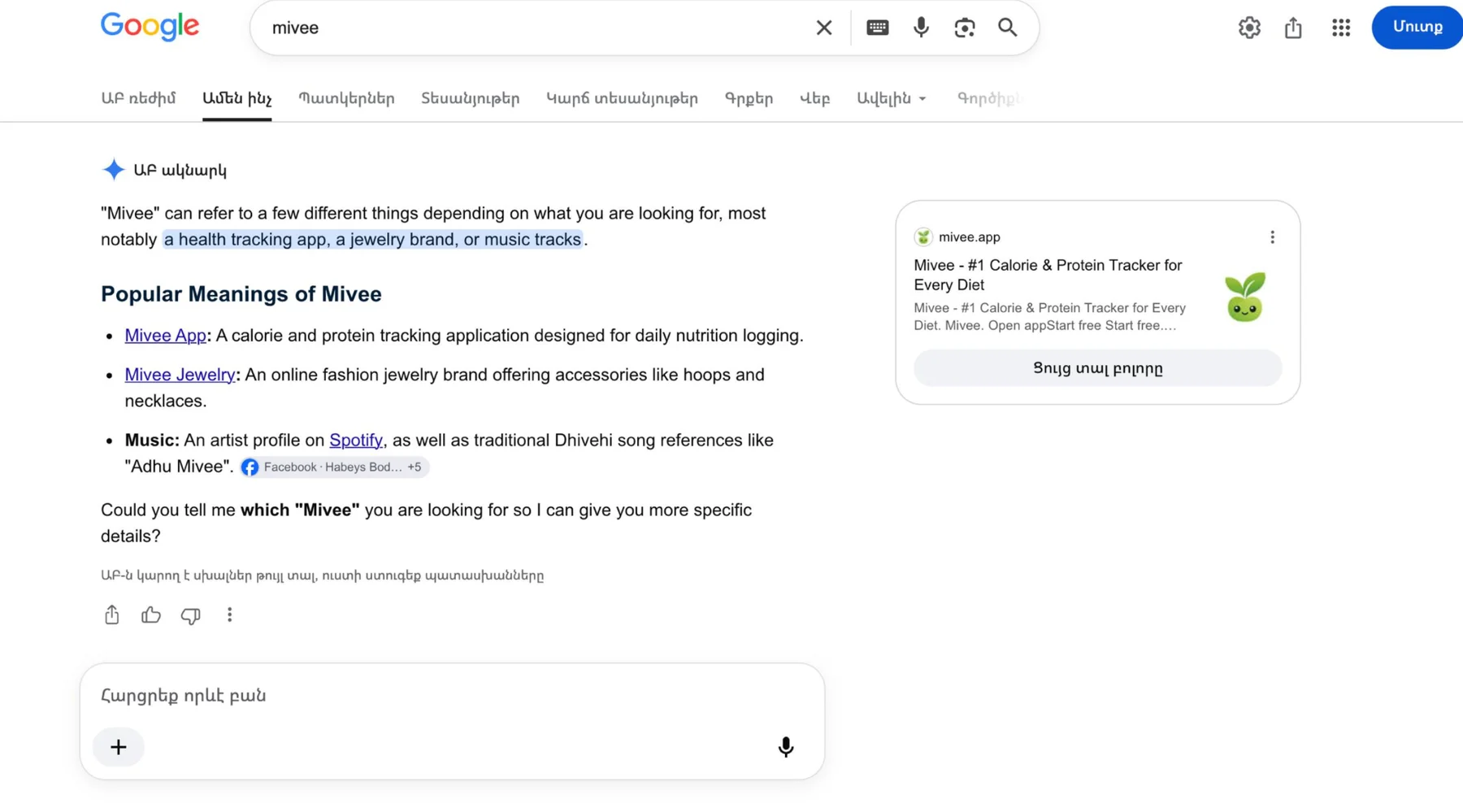
Someone entered the single word “mivee” in Google. In the captured result, Google displayed an AI Overview describing several possible meanings. Its first example identified Mivee App as a calorie and protein tracker for logging nutrition. A source card alongside the answer displayed mivee.app, the product's own domain.
The short query makes the example interesting. The searcher gave Google neither a product category nor a location. The overview also mentioned jewellery and music associated with the name. A person encountering the product for the first time could use the category and source card to distinguish the app from those other meanings.
What the screenshot establishes
Read the capture from left to right. First check the exact wording in the search box. Next read the answer itself. Finally inspect the domain in the source panel. Here, both the description in the overview and the title next to the source identify the nutrition app. Its public website also describes calorie and protein tracking, so a reader can verify that the answer refers to the right product.
The screenshot records one appearance for one branded query. It contains no earlier observation, repeated tests, traffic figures or account registrations. The interface language does not establish the searcher's physical location. A claim about visibility across Canada, or about people searching for a generic nutrition tracker, would require a separate set of observations.
| Check | Observed in the capture |
|---|---|
| Question | mivee |
| Brand recognized | The answer lists the Mivee nutrition app among several meanings. |
| Website shown | The source panel displays mivee.app. |
| Click or signup | No click or signup is measured in the capture. |
Repeat the exercise for your own product
Run a brand-only query and save what appears, including the search box and any source card. Then try the brand plus its product category. In a third test, remove the brand name and ask the kind of discovery question a prospective customer might ask. Keep the three answers in separate rows. The first tests recognition, the second tests identification and the third tests discovery.
For each row, compare how the answer describes the product with the public product page. Record confusing names, links to unrelated companies and outdated descriptions. Correct the public source you control where necessary. Date the observation, note the language and market you tested, and repeat the exact wording later. That gives a second observation to compare with the first.
Frequently asked questions
Did Google recommend Mivee for a generic nutrition search?
The captured query includes the brand name. A generic search such as “apps for logging daily protein” would be a different test and needs its own evidence.
Which change caused this result?
The available record shows the result and the supporting domain. It does not include a controlled comparison that could identify the effect of a particular change.